
What is IPTV? Ultimate Beginner’s Guide (2026)
Many people are asking, what is IPTV and how does it change the way we watch television? Internet Protocol Television (IPTV) is completely changing the way people watch TV worldwide. If you are tired of expensive cable contracts, satellite dishes that stop working during storms, or limited channel options, IPTV is the modern solution you’ve been looking for.
In this comprehensive guide, we will break down exactly what IPTV is, how it works, and what you need to get started with the best streaming experience.
📌 Table of Contents
- The Ultimate Definition: What is IPTV?
- How Does IPTV Work in Practice?
- IPTV vs Traditional TV: The Real Difference
- Different Types of IPTV Services
- What Do You Need to Use IPTV Setup?
- Why Choose a Premium IPTV Subscription?
- Frequently Asked Questions (FAQ)
The Ultimate Definition: What is IPTV?
To give you a clear answer to what is IPTV, it stands for Internet Protocol Television. Instead of delivering television programs through broadcast signals, radio waves, or traditional coaxial cables, IPTV delivers video content directly through your internet connection using the Internet Protocol (IP).
Basically, as long as you have a stable broadband internet connection, you can stream your favorite live channels, movies, and TV shows on-demand to any compatible device anywhere in the world. According to the official Wikipedia technical definition, this standard architecture ensures secure and streamlined digital content delivery direct to users.
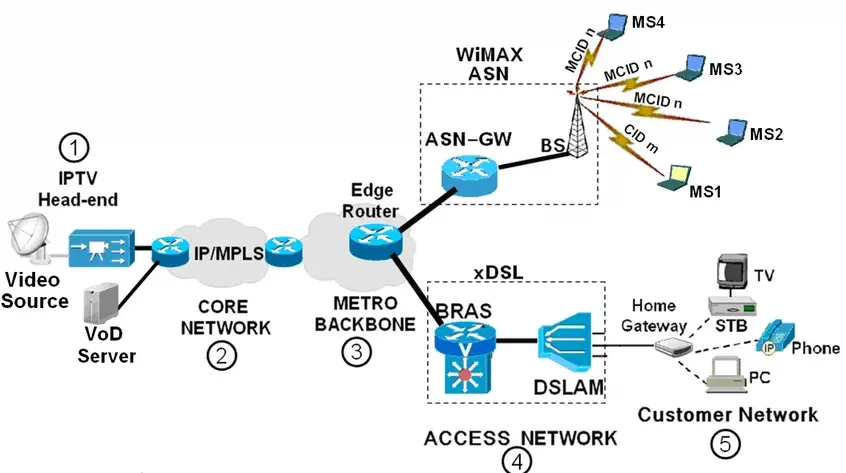
How Does IPTV Work?
To understand how does iptv work, think about how platforms like YouTube stream videos. Traditional TV broadcasts channels simultaneously, meaning you can only watch what is currently on the air.
IPTV works differently through a highly optimized system:
- Content Storage: Live TV channels and VOD (Video on Demand) libraries are stored on secure, high-performance servers.
- Media Preparation: The video data is converted into digital packets optimized for internet delivery.
- Streaming on Demand: When you select a channel or a movie, a private dynamic stream is established between the server and your device.
This infrastructure ensures that you only load the data you are actually watching, minimizing bandwidth usage and maximizing speed.
IPTV vs Traditional TV: The Real Difference
| Feature | Premium IPTV Subscription | Traditional Cable / Satellite |
| Delivery Method | High-Speed Internet Connection | Coaxial Cable / Satellite Dish |
| Channels Selection | 10,000+ International Channels | Limited Regional Packages |
| VOD Library | Included (Movies & TV Series) | Often Extra Fee (Pay-Per-View) |
| Hardware Required | Smart TV / Firestick / Phone | Heavy Set-Top Box & Dish |
| Buffering / Stability | Anti-Freezing Server (No Lag) | Affected by Weather/Storms |
Different Types of IPTV Services
When exploring the market, you will generally come across three main types of content delivery formats:
1. Live Media Streaming
This is the most popular feature. It allows you to watch live television broadcasts in real-time, exactly like traditional cable TV. This is highly sought after for live sports iptv (including major football leagues, Champions League, PPV events, and international news channels).
2. VOD (Video on Demand)
With Video on Demand, you don’t have to follow a TV schedule. You can browse a massive library of premium movies and complete TV series, hit play, and watch them whenever you want, with the ability to fast-forward, rewind, or pause.
3. Time-Shifted Media (Catch-Up TV)
Missed your favorite show last night? Catch-Up TV allows you to replay broadcasted streams from days ago so you never miss important entertainment or live events.
What Do You Need to Use IPTV Setup?
Setting up your system is incredibly simple. To enjoy a premium, lag-free experience, you only need three basic things:
1. A High-Speed Internet Connection
Because the streams travel completely over the internet, a stable connection is required. For standard definition, 10 Mbps is enough. However, if you want to stream in 4K and HD quality with zero buffering, we highly recommend checking your broadband performance using Speedtest by Ookla to ensure an internet connection speed of at least 16 Mbps to 25 Mbps.
2. A Compatible Streaming Device
IPTV is highly flexible and works on almost any modern digital screen. The most popular devices include:
- Amazon Firestick / Fire TV Cube (The most popular choice)
- Smart TVs (Samsung, LG, Sony, and Android TV systems)
- Android Boxes (Nvidia Shield, Formuler, Xiaomi Mi Box)
- iOS & Android Mobile Devices (Smartphones and Tablets)
- Computers (Windows, Mac, and Linux)
3. An IPTV Player App
To load your streaming playlist, you need an application installed on your device. To get the best integration, you will need to setup one of the best iptv players available on the market today, including TiviMate, IPTV Smarters Pro, IBO Player, and Flix IPTV. These apps act as a clean, digital interface where you can browse your channels and electronic program guide (EPG).
Why Choose a Premium IPTV Subscription ?
When you decide to upgrade your streaming setup, investing in a premium iptv subscription is the best choice you can make for dynamic stability. While looking around, you might find free playlists or extremely cheap options online. However, free lines are highly unstable, constantly cut out during major football games, and expose your network to cybersecurity risks.
Investing in a premium provider guarantees:
- Anti-Freezing Infrastructure: High-end premium servers that handle massive traffic loads during live sport events with no lagging.
- Massive Channels Variety: Access to thousands of premium international channels, premium movies, and full documentaries.
- Xtream Codes & M3U Playlist Support: Flexible connection protocols that allow you to set up your line on any player app within two minutes.
Frequently Asked Questions (FAQ)
Is a Free Trial Available?
To maintain maximum server speed and avoid overload for our active users, we do not offer free trials. Instead, we provide a highly affordable 1-month entry plan so you can test our premium stability with zero risk.
Can I Use IPTV on Multiple Devices?
Yes, you can install your subscription on multiple devices, but standard lines allow one active stream at a time. If you need to stream on multiple screens simultaneously, you can upgrade to a multi-room package.
Do I Need a VPN for IPTV?
While our servers are completely secured with high-end WAF and automated traffic protection, using a VPN can sometimes help bypass local ISP throttling if your internet provider slows down streaming traffic.
Ready to Upgrade Your Entertainment?
Now that you know exactly what IPTV is and how it can transform your TV experience, it’s time to choose a reliable provider.
At Mom IPTV, we focus on providing a premium, luxury streaming service with unmatched stability, ultra-fast servers, and 24/7 dedicated support. We don’t compromise our speeds with free trials, but we offer a highly affordable entry plan so you can test our solid performance yourself.
👉 [Get Your 1-Month Paid Trial Now]
